// self-hosted family server for Apple Silicon

Where are your family's
stories?

I built for my family: our own AI, on a Mac in our house. Send it a letter or a voice message in the family chat. Months later, ask about it, and it answers with the letter or the story. Open source, no cloud account needed.

It turns the Mac into
  • local AI for the family
  • a document archive
  • a shared photo library
  • a family wiki and diary
  • notes and bookmarks
  • a private family chat
  • and more
Not only for families with kids
The family wiki, demo family
The start page of a demo family's wiki.
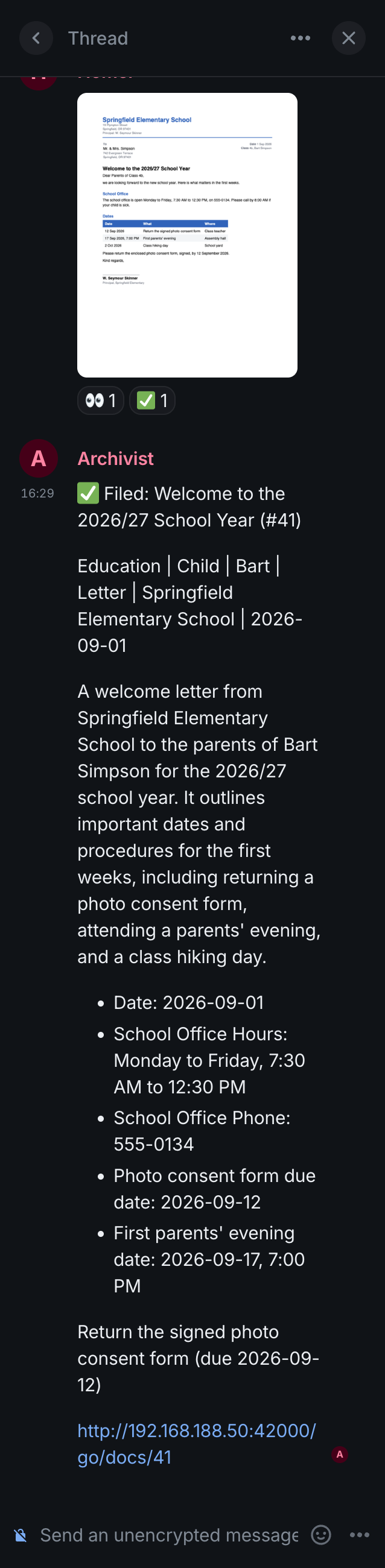
On a phone: a school letter sent to the family chat, and the archivist's answer with its title, tags and dates.

How do you organize your documents?

Ever wished you could just find a letter, from your phone?

Photograph a letter, a contract or grandma's recipe and send it to the family chat. files it. A year later, it answers your question and shows you the letter.

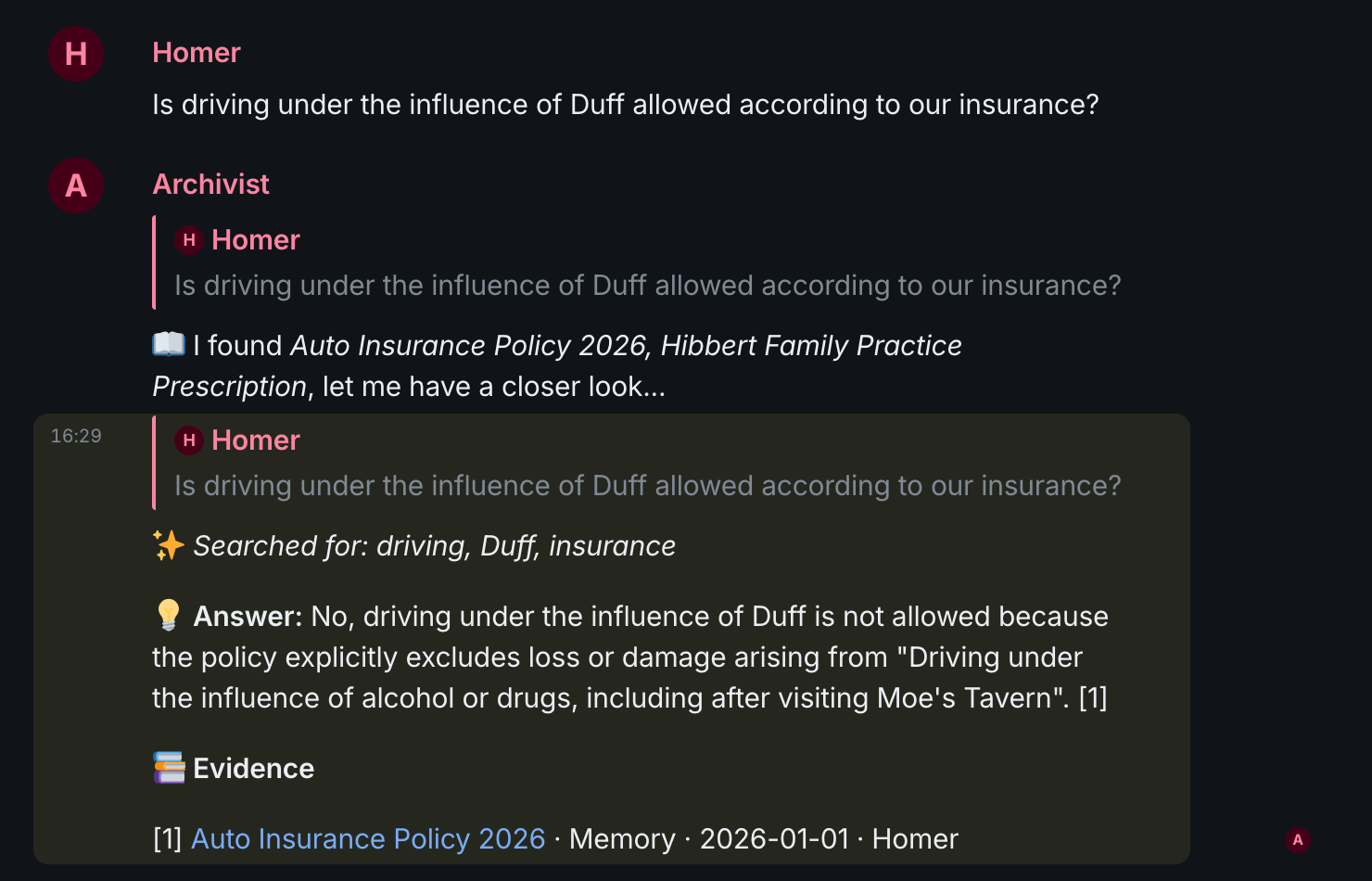
How filing works Homer asks whether driving under the influence is covered by the insurance. The archivist answers no, quotes the policy and names it as evidence.

How do you keep your photos?

Ever wished they were always there, and shared with your family?

Install the app on every phone. keeps every photo at home on your Mac, backed up by itself and shared with the people you choose.

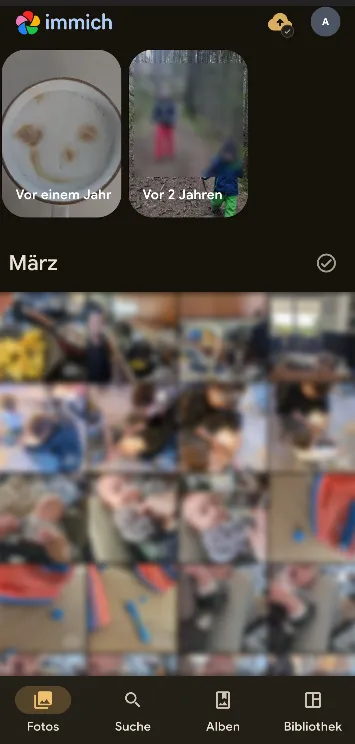
Sharing photos in a family The Immich app on a phone: a family's photo timeline, with the photos blurred.

What did your kids say last year?

And that story your grandfather tells. Ever wished you had kept it?

Send a voice message to the memories room. writes it into a family diary that you can read and listen to for years.

How the diary works
I wish I had started six years earlier.
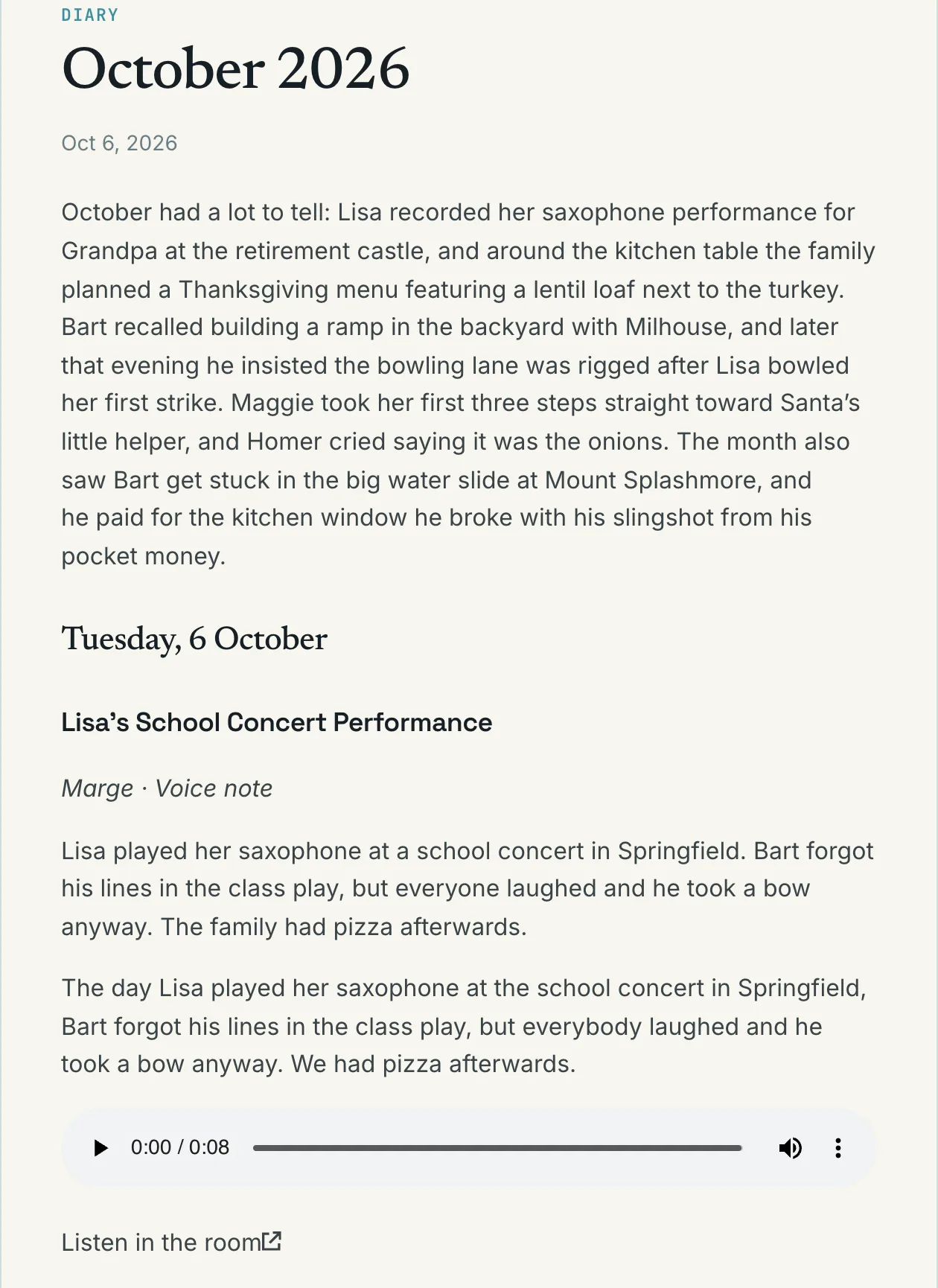
A month of a demo family's diary: a voice note about a school concert, with its transcript and an audio player.

Who knows when the car insurance renews?

Ever wished it wasn't all in one head?

Keep sending things to the chat. writes them into a family wiki, a page for every person and topic, every line with its source.

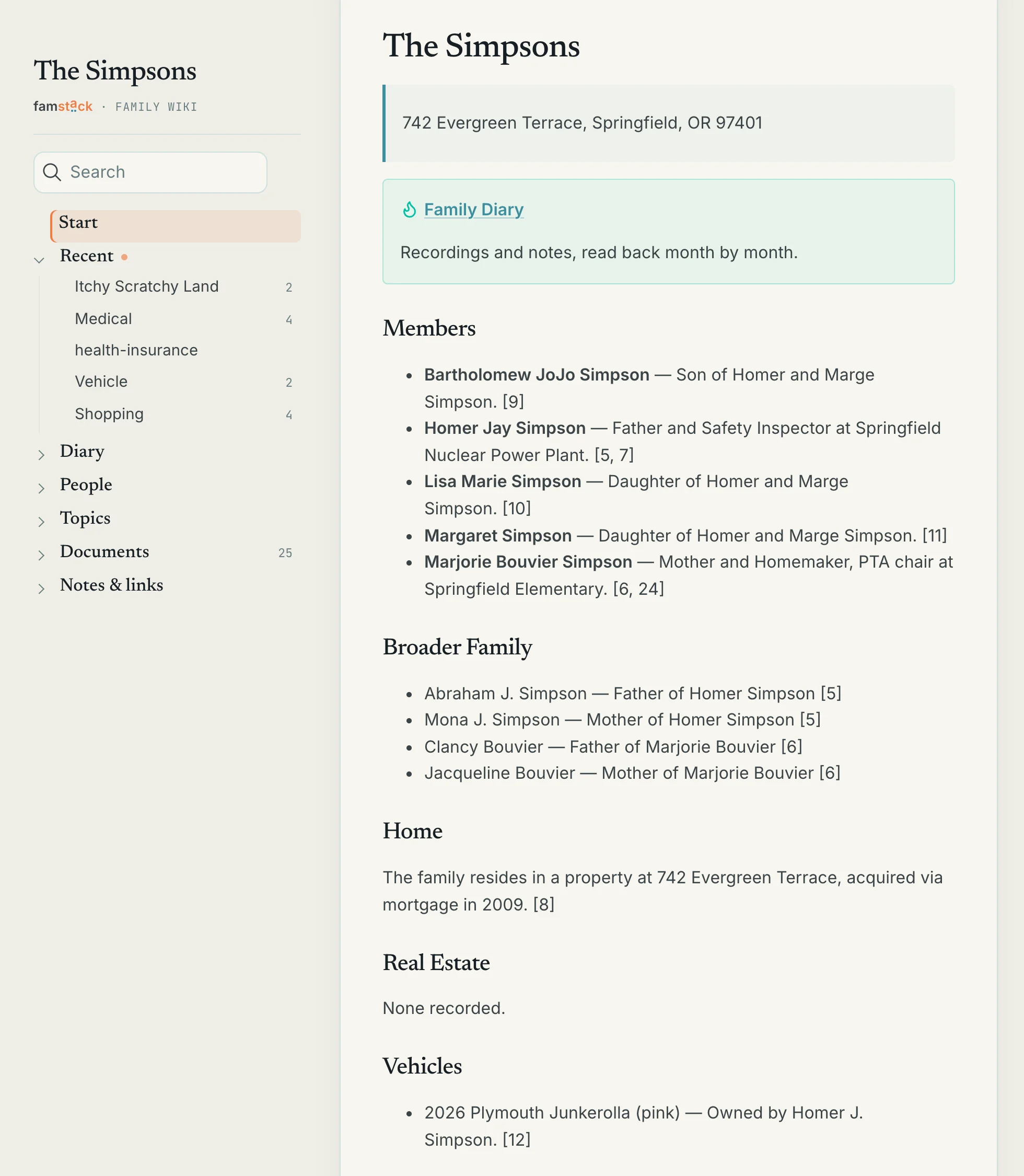
The family wiki The start page of a demo family's wiki: the address, the diary, the members, each line with the numbers of the documents it came from.
The family chat, demo family
Homer asks whether driving under the influence is covered by the insurance. The archivist answers no, quotes the policy and names it as evidence.
The Immich app on a phone: a family's photo timeline, with the photos blurred.
The family diary, demo family
A month of a demo family's diary: a voice note about a school concert, with its transcript and an audio player.
The family wiki, demo family
The start page of a demo family's wiki: the address, the diary, the members, each line with the numbers of the documents it came from.

Empty the drawer.

Every family has one. Tap each thing to send it to the family chat. 6 left.

FFamily chat

What's in your drawer?

Start with the letter from the school. It takes about half a minute for all of them.

A demo in this page, with the made-up family of our docs. Nothing is sent anywhere. The real chat has a room for each kind of thing, and photo backup runs in the Immich app.

and the rest of family life.

Where does your family chat?

Use it like any messenger, on iPhone, Android, Mac, Windows or in the browser.

famstack runs a private Matrix server on your Mac, with Element X as the app. Element X encrypts a direct chat between your devices, and a bot only reads a room you invite it to. Send a PDF from your phone, and open it on the Mac.

Also away from home

Who keeps the shopping list?beta

Start a list once, with the sections in the order you walk through the store. Then say what you need to Stacky, the family agent, by text or by voice.

famstack puts each item in its section, and something you bought before goes back where it was. It also keeps the packing list and a calendar list of the family's dates.

How lists work

Who reads the family mailbox?

Point a mailbox at a chat room.

famstack delivers new mail as a message, leaves out the newsletters, shows links as plain text, so a phishing link can't be tapped, and files the attachments like any other document.

How email works

Want AI without uploading your family's life?

famstack runs the models on your Mac's GPU, or on a bigger Mac in the house, and uses them to read, transcribe and answer.

16 GB runs a smaller model, fine in English and weaker in German. 32 GB or more for the best quality.

What if the disk dies?beta

Plug in an external APFS disk and run ./stack up backup.

famstack copies the photo originals, the documents and the chat, voice messages included, to it every night. The Immich and Paperless databases are not in it yet, so you would get the files back, but not albums and tags.

What if you could just tell your house?in testing

I tell my phone to turn on the lights in my office. My wife sends me a message from the bedroom while I cook, and Stacky says it out loud in the living room. We ask it to set a timer for the cake.

famstack switches your Hue lights locally through an extension, says things out loud and runs timers. Asking for all of it in the chat runs at our house, and is not in a release yet.
is not only for families with kids.

I built it as a dad, so many of my examples have kids in them. But everyone has letters to find, photos to keep and memories of their own. You can run it for whoever shares your home, or just for yourself.

Just the two of you?

The lease, the insurance and the tax letters are in one place you can both ask. You each get your own photo account, with shared albums.

Living alone?

Send it your contracts, and a voice message when something happens that you want to remember. It keeps your own archive and writes your own diary.

Parents getting older?

Record your mother telling how she met your father, and send it to the memories room. It goes into the diary with a transcript, and you can play the recording there.

Sharing experiences?

A holiday, a wedding, the first summer in a new home. Give it a room of its own, like "Topic: Summer at the lake", and everyone sends their voice messages, notes and links there. Ask in that room years later, and the answer comes from that summer.

Build your family's memory.

Documents, voice messages, notes, lists and mail all go into one place, and the answers come from all of it. Pick something your family does and see where it goes.

Your Mac
Your phone
chat and the Immich app
on your Mac
Family chat
Matrix
Local AI
on your Mac
Documents
Paperless-ngx
Family wiki
diary, lists, topics
Backups
a second drive
Photos
Immich

Snap a letter in the family chat on your phone. The local AI reads it, and Paperless-ngx files it on the Mac.

Local by default. No cloud account needed.

Become a er.

Own your family's most valuable data.

~ git clone https://github.com/famstack-dev/famstack
~ cd famstack
~/famstack ./stack  # that's the whole install

Your browser then opens the dashboard. It asks who is at home, then sets up the chat, photos, documents, local AI (10 to 20 minutes) and the family memory with you.

You need a Mac with Apple Silicon and at least 16 GB of memory, Homebrew and OrbStack. Open source, AGPL. Built on Immich, Paperless-ngx, Matrix and Element X. Tried it? Tell me what broke.

I'm a builder. I don't email often.

When I publish something worth your time, you get one email. Unsubscribe anytime.