Building a Local Second Brain is a series, and this is the overview. The build log: Our paperwork was chaos · Photo to filed (soon) · A vocabulary for the model (soon) · Building the wiki (soon) · Who the family is (soon) · Off the cloud (soon)
“An enlarged intimate supplement to his memory.”
— Vannevar Bush, describing the “memex,” 1945
In 1945 Vannevar Bush imagined the memex: a private machine that would hold all your books, records, and letters, “mechanized so that it may be consulted with exceeding speed and flexibility,” with links between things you could follow like trails. A second brain, decades before anyone used the phrase.
#Storage was the easy half
The store half of Bush’s memex we’ve had for years. Scanners, Paperless, self-hosted document management: a searchable archive of every document you own. The half he never got, and nobody since, is the intelligence layer. Something that actually reads the pile, pulls out what matters, links it, and keeps it current. Building those trails by hand is the work no human sustains, which is why the index-card Zettelkasten, the Obsidian vaults, and the whole second brain movement keep hitting the same wall. The filing is the part people abandon.
  the second brain, over time

  1945    Memex             an "intimate supplement to memory", on paper, in theory
   │
          Zettelkasten      index cards, linked by hand
   │
  2010s   Obsidian, Notion  digital notes, still typed and linked by you
   │
  2026    the LLM wiki      the model writes and maintains it (Karpathy, then OKF)
   │
  now     famstack          a family's, built from its documents, fully local
That maintenance, the reading, linking, summarizing, and filing, turns out to be exactly what an LLM is good at. Andrej Karpathy sketched the pattern in 2026; Google standardized the file format weeks later. The memex finally has something to keep its trails: private, self-hosted document management with an intelligence layer on top. And it can run on a Mac in your living room.
#What it looks like for a family
For us, those trails are the family’s paperwork. When we applied for the mortgage, the lender’s checklist ran past a dozen documents: months of pay slips, two years of tax assessments, the existing loan statements, proof of address, IDs, the insurance on the place. Assembling it ate a week of evenings, one piece at a time, out of binders and drawers and folders of scans I made years ago and never opened again. And the mortgage is just the big one. The small version happens most weeks: a school form, a warranty claim, a number off a letter that arrived ages ago.
So I built it. Three months in, there’s a local second brain running on a used Mac Studio in the corner of the room: a self-hosted AI that reads our documents, files them, pulls out the facts that matter, and answers questions in the family chat.
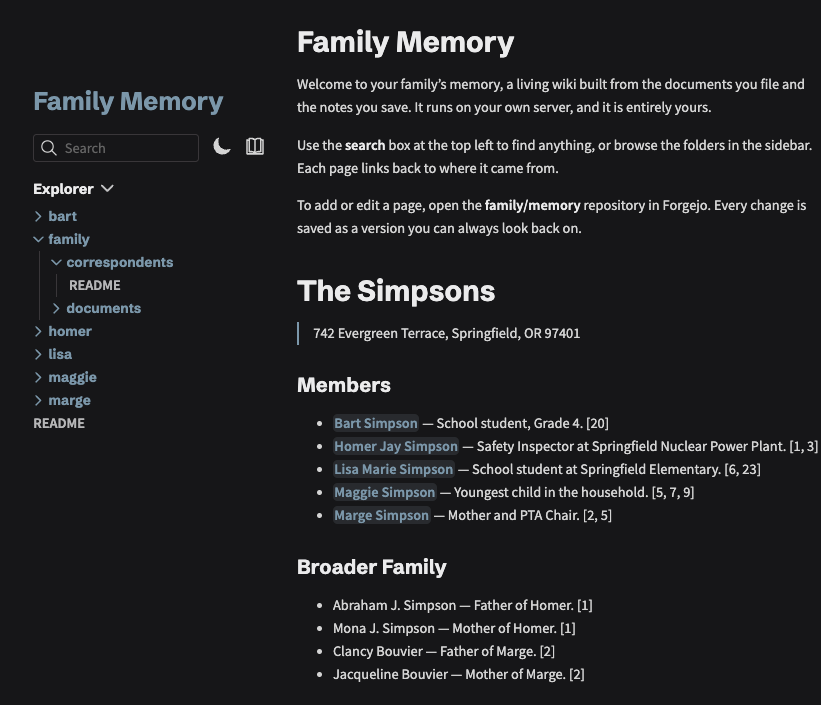
Everything here runs local. The model that reads our documents runs on our own machine. Birth certificates, tax records, medical letters, none of it leaves the house. That’s not a feature bolted on for marketing. It’s the constraint the whole thing was built around.
#What a “local second brain” actually is
Strip the buzzword and it’s a pipeline with three honest stages.
   a letter arrives
        │  photo into the family chat, or a PDF
        ▼
  ┌──────────────────┐
  │ 1. INTAKE        │ Text extraction, filed into Paperless
  └────────┬─────────┘
           ▼
  ┌──────────────────┐
  │ 2. UNDERSTANDING │  a local model reads it:
  │ (model on        │  what is it? who is it about?
  │  your own Mac)   │  pull out the facts that matter
  └────────┬─────────┘
           ▼
  ┌──────────────────┐
  │ 3. MEMORY        │  facts compile into a wiki,
  │ (markdown + git) │  one page each, every claim
  │                  │  linked back to its document
  └────────┬─────────┘
           ▼
   "when does the car insurance renew?"
        → answered in the chat, with the source
Intake. A document arrives (or any other piece of information). Someone photographs it into the family chat, drops in a link, or sends a voice message. Or it arrives as a PDF. It gets OCR’d and filed into Paperless. This part is boring and solved.
Understanding. A local LLM reads each piece of information, decides what it is and who it’s about, and pulls out the facts that matter: the renewal date, the policy number, the amount, the deadline. This is the part that was impossible two years ago and is merely hard now.
Memory. This is the part that still feels like magic. Those facts compile into a wiki, fully local: one page per family member, per topic, per thing you own, every claim linked back to the document it came from. You ask the family chat a question and it answers from the wiki, with sources.
The whole thing is plain markdown files in a git repo. No database, no proprietary store, no account. And it feeds itself: most second-brain how-tos have you drop files into a folder by hand, but this one updates from the documents already flowing in. Photograph a letter into the chat, and the brain has it minutes later.
#Why it has to be local
This is the part I won’t compromise on, and it’s the reason the whole design looks the way it does.
A cloud assistant has to keep a wall between you and your own data. Someone decides what’s safe to send the model and what to hold back, the bank details, the medical history. That wall is real engineering, and it exists because the model lives somewhere you don’t fully trust.
  CLOUD                            LOCAL  (on your Mac)

  your documents                   your documents
        │                                │
        ▼                                ▼
  ┌──────────────┐                 ┌──────────────┐
  │ redaction    │                 │  the model    │
  │ wall         │                 │  reads it     │
  └──────┬───────┘                 └──────────────┘
         │ the rest leaves               nothing leaves,
         ▼ the house                     nothing redacted
  someone else's model
When the model runs on your own machine, there is nothing to redact. You don't hide your tax records from an assistant that lives in your house.
Every question I spent this project worrying about, what lands on a page, what gets cut, was about relevance and token budget. Never about secrecy. The assistant can see all of it, because it can’t leak any of it. Full trust comes for free, but only when you own the hardware. That’s the entire pitch, and it’s why “just use the cloud version” is the wrong answer for a family’s records.
#What a family’s second brain actually holds
The productivity version of a second brain is built from what you sit down and type: notes, highlights, bookmarks. We keep those too. The interesting part is how little typing it takes here. To a computer your documents are unstructured data, a scan is a picture, a PDF a blob of text, but they are dense with facts. Structuring that pile and pulling the knowledge out of it is the whole job, and it is the part nothing could automate until local models got good enough to read.
One insurance policy hands you the renewal date, the policy number, the coverage, the premium, and the company, without you entering a thing. A payslip gives an employer and an income. A birth certificate gives who is related to whom. Multiply that across years of mail and a detailed, factual picture of the household assembles itself out of paper you were going to file anyway.
That picture is the boring, load-bearing stuff that turns into a half-Sunday hunt the moment you need it: renewal dates, mortgage terms, contracts, the kids’ school and medical records, warranties, tax letters, the car papers. And the things you would want your family to find if you were not around to find them. The second brain never asked you to write any of it down. It read it.
#Documents are just the first source
I started with documents because they’re the hardest: dense, factual, the kind of thing that costs you money when you forget it. But a document is only one kind of input. The same move, hand it to the system and let it take care of the rest, already works for the photo you snapped, the voice memo from the walk home, the article you saved, the note you dumped at one in the morning.
The longer game is the rest of what a family accumulates: a diary entry, a trip you’re half-planning, the thing your kid said that you want to remember. Paperwork was just the part screaming loudest. A second brain that only holds paperwork isn’t much of a brain.
#What you actually need
Honest requirements, because most write-ups skip them:
- A Mac with enough memory. The model has to fit in RAM. 16 GB runs small models that are fine for filing and tagging; 32 to 64 GB runs the larger ones that write a decent wiki page. How local LLMs work on a Mac covers the sizing.
- The stack. Paperless for documents, a local model for the thinking, and the glue that wires them together. famstack is the open-source version of that glue.
- A terminal and some patience. This is self-hosting. It’s not an app you install and forget.
- Realistic expectations. A small local model is not a frontier model. It’s good at reading a document and telling you what’s in it, and limited past that. Knowing where that line sits is half the battle.
#Getting a local model good enough
Before any of the family logic, there was a more basic fight: a local model is not one thing you install and trust. You pick an engine and a model, and they behave wildly differently. The engine everyone calls faster, MLX, turned out slower for my actual workload, because the tokens-per-second your UI shows is not the number you wait for. I measured it in detail in 57 tok/s on screen, 3 tok/s in practice.
So I stopped trusting synthetic numbers and built my own benchmark suite, local-llm-bench, to measure total response time on real tasks: document classification, growing context, long replies. That is how I picked what actually runs the pipeline. Then came quality, which speed numbers don’t capture at all: which small model tags a document correctly and writes an honest page, not just a fast one. And then weeks of prompt tuning to get a 9B model to pull facts out of a document without inventing them.
None of that shows up in a “self-host an AI” tutorial, and it’s most of why this took three months and not a weekend.
#The parts that fought back
The honest reason this took three months and not a weekend: a small local model maintaining a knowledge base fails in ways that are not obvious until you measure them. Local models take more engineering than frontier ones, but it frees us from the whims of the frontier providers: their price changes, their deprecations, their shifting rules.
The first iteration I built lost more than half the facts in the documents, and which half it dropped changed every time it ran. A stronger model scored worse, not better, because it curated harder. It once invented two family members out of the parent fields on a birth certificate and listed them like residents. Filing a single new document rewrote 60% of a page that should not have changed.
The thread running through all of it: a language model is the wrong tool for the load-bearing jobs. At least with the current state of local AI. The fix was never a cleverer prompt. It was moving the work that has to be correct, the fact extraction, the citations, the updates, out of the model and into plain code, and letting the model do only the part it’s actually good at: reading thirty documents and writing five honest sentences about a person.
The full build log walks through each of those failures with the numbers. Start with how this began, the first prototype that filed a document by itself and got me hooked.
#Where to start
The whole stack is open source: famstack. It runs on Apple Silicon, costs a few cents a day in electricity, and keeps every document on a machine you own.
And if you’re a freelancer or a small office buried in paper rather than a family, this works for you too. Often the pain is worse, and the documents are more confidential.
#Read the series
This guide is the overview. The build log goes deep on each hard part as it lands:
- Where it started: our paperwork was chaos
- Getting a document from a photo to filed (coming)
- Teaching a small local model a vocabulary (coming)
- Building the wiki, and why it kept losing facts (coming)
- Teaching it who the family actually is (coming)
- Why a second brain has to stay off the cloud (coming)