That Mac Mini on your desk? You’re sitting on one of the best home servers money can buy.
Silent, tiny, 6 watts at idle. And unlike every other home server option, it can run real AI models locally. Not cloud APIs. Not toys. Actual 30-billion-parameter models doing useful work, right there on your shelf, when you have 32GB of RAM.
Most guides will tell you to set up Plex, maybe some file storage. That’s fine. But your Mac can do so much more:
- Ask your documents. Drop a letter or a receipt in the family chat. Months later, ask about it in plain words and get the answer with the document it came from.
- Back up every family photo. On your hardware. No Google, no iCloud, no monthly fee.
- Keep a family diary. Voice messages and photos sent to one chat room become a monthly diary, as plain files on your Mac.
- Run AI models locally. Reading documents, transcription, summarization. Nothing leaves your network.
- Run a private family chat. Self-hosted, encrypted. With bots that handle the tedious stuff.
- Block ads on every device. Network-wide DNS filtering. No app installs, no browser extensions.
I run all of this on a Mac Studio M1 Max. My family sends receipts to a chat channel, and 60 seconds later they’re OCR’d, classified by AI, and filed. When I need one later, I ask in the chat. We have a #memories channel where we record family moments during dinner with the kids.
I measured the electricity: 8 watts idle, 30-50 watts during AI inference. Less than our old entertainment system draws on standby. About $3-5 a month for everything.
Your Mac Mini can do all of this. Probably faster, if you have an M4.
#Why Mac Mini beats traditional home servers
Go to r/selfhosted or r/homelab. It’s Linux boxes, NAS units, Raspberry Pis, repurposed Dell Optiplexes. The homelab crowd hasn’t caught on to Macs yet.
Unified memory. On a regular PC, CPU and GPU have separate memory pools. A 30B parameter AI model needs roughly 20GB of VRAM. Good luck finding a consumer GPU with that. On a Mac, CPU and GPU share the same pool. A 32GB Mac Mini loads a 30B model and runs it. No separate GPU card. No CUDA drivers.
Power. I bought a watt meter and measured everything. Mac Mini M4: 6 watts idle, 25-35 watts under AI load. A modest Linux server with Nvidia GPU: 150-300 watts. The Mac pays for itself in electricity within two years.
Noise. Fan doesn’t spin at idle. Under load you have to put your ear next to it. This thing sits on a shelf in my living room. No closet, no basement.
It just runs. macOS doesn’t have kernel updates that break your boot loader, driver conflicts, or systemd mysteries. I haven’t restarted my Mac Studio in months.
#What runs on my Mac Studio right now
All of it works on a Mac Mini. If you want to follow along, prepare your Mac as a home server first.
#Family photos
Immich is an open-source Google Photos replacement. Install the app on every phone in the family. Photos and videos back up automatically over WiFi. Face recognition, shared albums, map view, search. My wife uses it every day and has no idea how it works. That’s the right outcome.
No storage limits except your SSD. No AI training on your family’s faces. No “storage almost full, upgrade for $2.99/month” notifications.
Set up Immich on your Mac → Set up family sharing →
#Documents you can ask about later
We have a channel called #documents in our family chat (Matrix, self-hosted on the same Mac). Letter in the mail? Photograph it, drop it in the channel. Receipt from your email? Forward it there.
A bot watches the channel. It sends the file to Paperless-ngx for OCR, then asks the local AI to classify it: title, category, person, document type. Sixty seconds later it replies: “Filed: Electricity bill, February 2026, Stadtwerke, Utilities.”
Later I ask the bot (famstack calls it the archivist) in the chat, typed or spoken. The answer names the documents it read, and one tap opens the original.
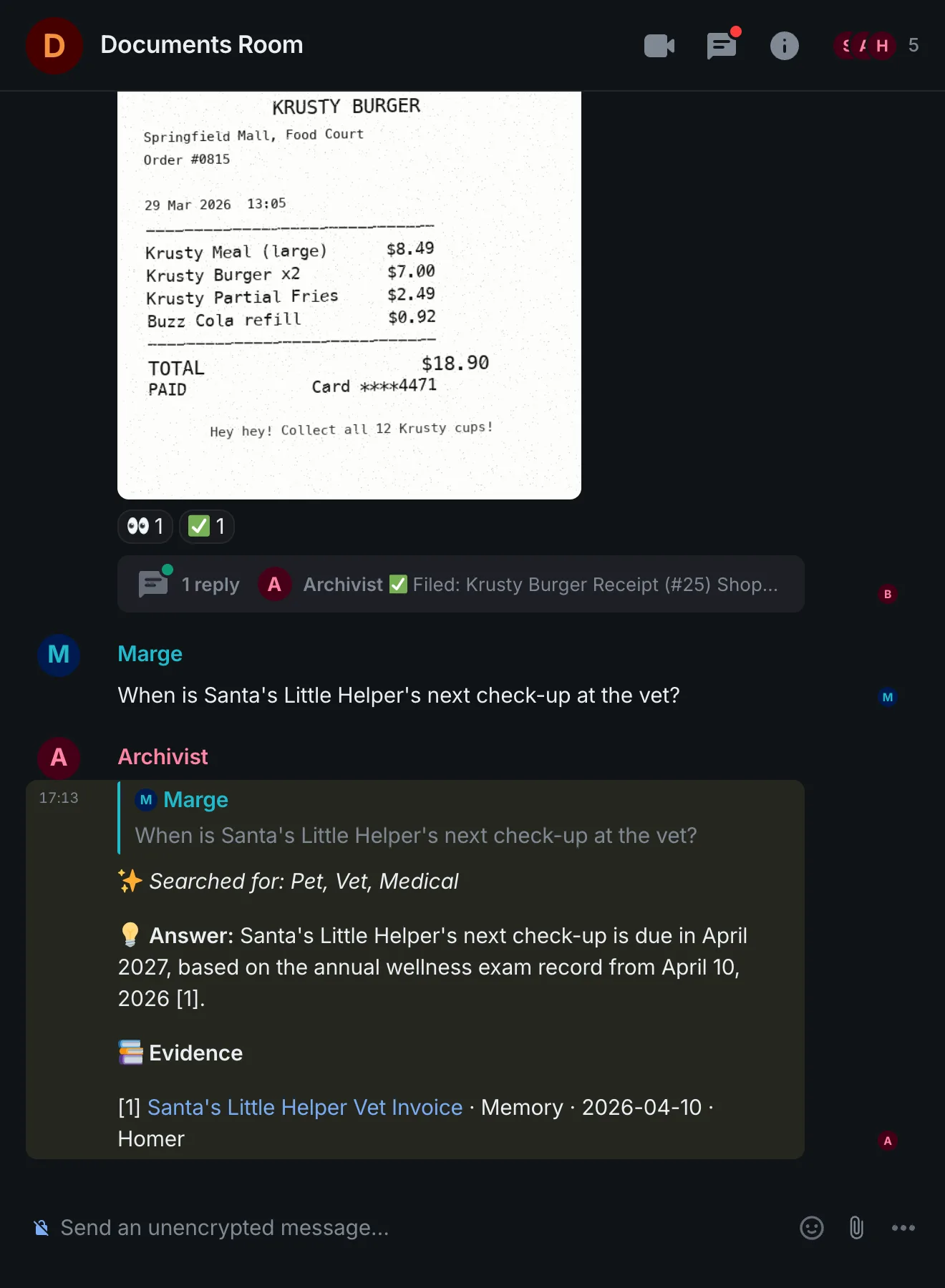
On a 16 GB Mac the models that fit are small. In my testing on a 16 GB MacBook with a 9B model, a document took about a minute to file. famstack can run the chat model on a bigger machine in the house instead (./stack ai switch <url>).
I spent years being embarrassingly bad at organizing paperwork. This solved it. Running on 8 watts.
#Local AI
Local models are not ChatGPT. You won’t have deep philosophical debates with a 14B model. That’s not what this is for.
Local AI shines when it’s wired into your services. Classify this document. Tag this photo. Transcribe this voice note. Summarize this email. A 14B or 30B model handles these well, and they run fast enough to feel instant.
Two runtimes matter on Apple Silicon: GGUF and MLX. I benchmarked both across real workloads and the results were clear. LM Studio is the best option for GGUF models, with a polished chat interface and solid performance. oMLX runs MLX models natively with Metal acceleration. The benchmark numbers are here if you want the details.
On 32GB, models up to 30B parameters run at conversational speed. On 16GB, 7-9B models still cover most everyday tasks. Pair either with Open WebUI and you have a full private chat interface, no API key, no data leaving the house.
If you want to understand what’s happening under the hood: how local LLMs actually work on a Mac.
#Private family messaging
Matrix with Element as the client. End-to-end encrypted, self-hosted, on your own hardware. We use it for family coordination, the #documents channel, and a #memories channel where we keep things we want to hold onto. We made it a habit to speak our diary with the kids once or twice a week during dinner.
With famstack 0.4, the #memories channel becomes a family diary in famstack’s family wiki: one page per month, each memory with its summary, the transcript and the original recording. All of it plain files on the Mac, backed up like any other folder.
It’s not a WhatsApp replacement for your extended family. It’s more like a private family intranet that nobody else can read, that doesn’t disappear if a company changes its terms of service.
#Network-wide ad blocking
AdGuard Home turns your Mac into a DNS server that blocks ads and trackers for every device on your network. Phones, tablets, smart TVs, that weird IoT toaster your spouse bought. Point your router’s DNS to your Mac and it works.
The dashboard shows you exactly what’s being blocked. Turns out your smart TV makes hundreds of tracking requests per hour. Not anymore.
For families: filter lists can block adult content, gambling sites, malware domains. Works great for younger kids. Your teenagers will find workarounds within a week, but that’s a different battle.
#Voice and automation
Text-to-speech runs locally on Apple Silicon. When my server boots up, it greets me: “All systems running. 4 services active. 47 gigs of memory free.” Out loud. Through the speakers.
Voice notes are the fastest way to capture a thought, but they pile up and become useless if you never process them. Local speech-to-text changes this. Record a voice memo, send it to your server, get back a clean transcript. The AI summarizes it, extracts action items, files it under the right project. Something pops up in your head while walking the dog, lying in bed at 2am? Talk, send, forget. The server handles the rest.
The pieces are all there for a home assistant that doesn’t report to Amazon or Google. The rabbit hole keeps getting deeper.
#The real cost
After two to three years, the Mac Mini is cheaper than cloud subscriptions. After that you’re paying $4 a month for electricity. And you own everything.
#What I’d buy
The used market play. Mac Studio M1 Max, 64GB. What I bought, around €1,700 used. The M1 Max has more GPU cores and higher memory bandwidth than the M4 base. 64GB runs anything. If you find one at a good price, it’s hard to beat for a local AI server.
#How to get started
If you want the whole stack at once: famstack is what I run, open source. It wires photos, documents, chat and local AI together on one Mac. If your Mac isn’t set up as a server yet, prepare it first. Then clone famstack and the installer walks you through the rest:
git clone https://github.com/famstack-dev/famstack.git
cd famstack
./stack
Each service is a “stacklet” you turn on with one command: ./stack up photos, ./stack up docs, ./stack up ai.
If you’d rather build it piece by piece, pick one thing. Don’t try to set everything up in a weekend.
- Photos matter most: Set up Immich. Get your family’s phones backing up.
- Local AI first: grab LM Studio for GGUF models or oMLX for MLX. Have a conversation with a local model. Try a 30B model if you have 32 GB.
- Understand what you’re building: the guides on this site each cover one service in depth. Pick the services you care about.
I run all of this on a Mac Studio M1 Max for my family of four at Lake Constance, Germany. Questions? Find me on Bluesky or Discord.